
Turn-by-turn navigation, computed on your phone.
BanditKin can run routing and address search entirely on the device. In its two fully private modes, your destination and what you search for never leave the phone — no server computes your route, and no one can sell it. The default, Anonymous Online, works like Google or Waze — full search and traffic-aware routes — but anonymized through a relay: the provider sees a question, never who's asking. The app tells you exactly what each mode sends. The base map is offline; sharing your live location with your circle is end-to-end encrypted.
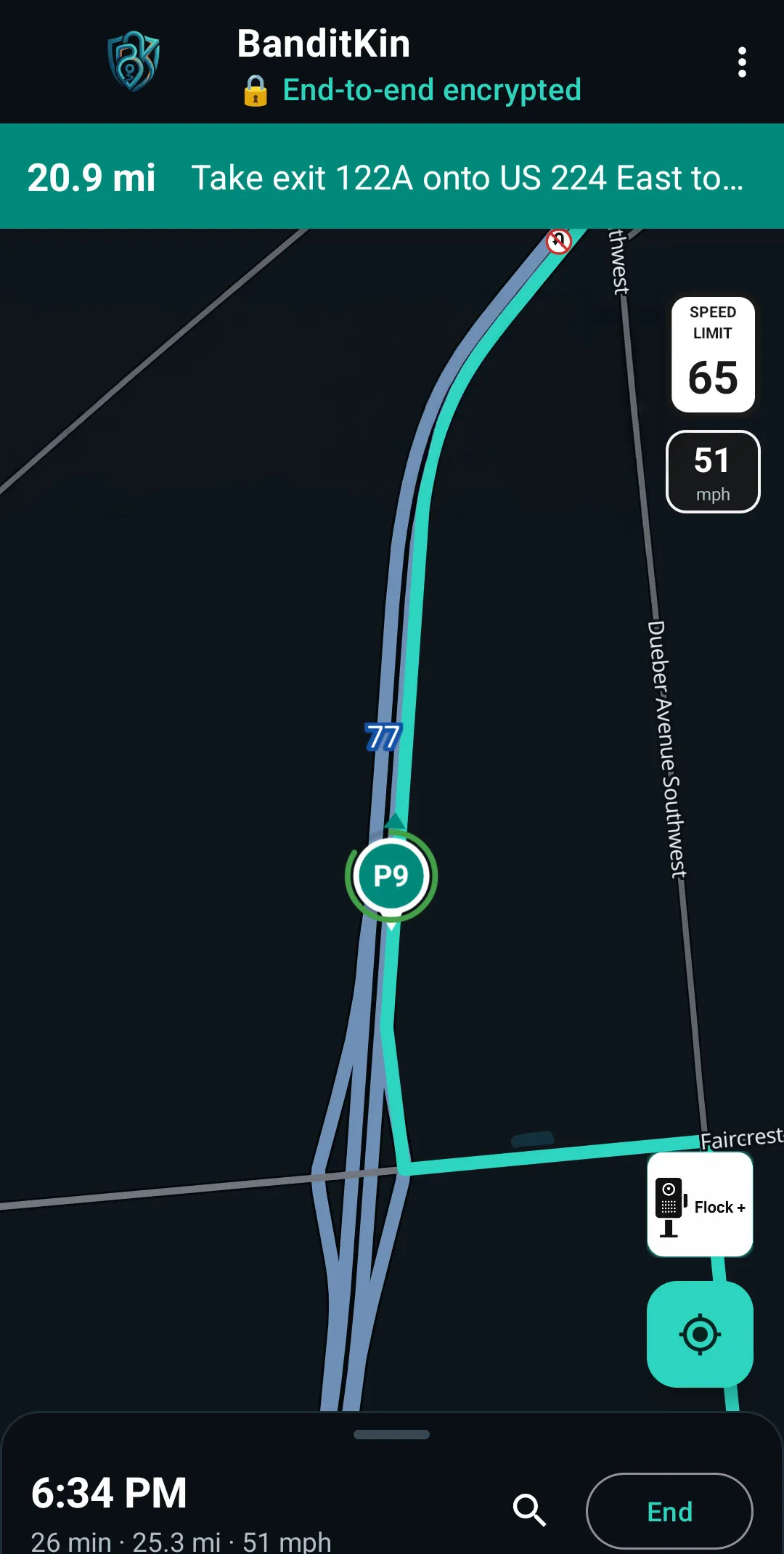
Navigation modes
A privacy ladder you control
Three modes, one dial: how much leaves your phone. Each is labeled in the app with exactly what it sends — including when a mode is less private than the others.
Routing and search run entirely on your device against downloaded data — your destination, route, and searches never leave the phone. The trade: brand-new places or unsaved areas may need a download first.
Stays private, fills the gaps. Heading somewhere you haven't saved, the app fetches that area's data — a whole county's roads and addresses — through an anonymizing relay. Only a broad area is ever requested, never where you're going. Routing still happens on your phone.
The default on a new install — the closest to Google or Waze, with the most complete search and traffic-aware routes. Your query and route endpoints are sent, but anonymously through the same relay: the provider sees what you asked and roughly where, never who. No account, no ad ID. The app labels this “less private than the other modes,” in exactly those words.
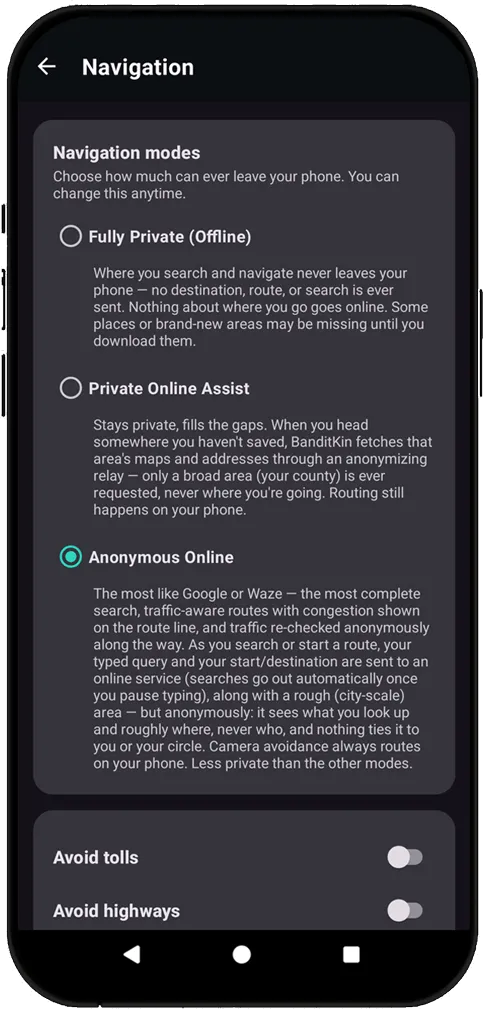
A privacy dial you can see
Every mode spells out exactly what leaves your phone, right on the settings screen — from Fully Private, where nothing about where you go goes online, to Anonymous Online, which the app itself labels “less private than the other modes.”
What leaves your device — and what never does
The honest version: in the two private modes, the only thing that goes online for navigation is a request for the map data of a general area — never the place you're going, never what you search. In Anonymous Online (the default), your query and route endpoints do go out — anonymously, through the relay.
Everything that could identify where you actually went stays on your phone.
Three things, all on the device
Real turn-by-turn with a heading-up map, adaptive zoom near turns, and follow-me tracking. The route is computed in-process by an open-source engine (BRouter, MIT) — there is no routing server your destination is sent to.
Address and place search runs against an index built into the app from OpenStreetMap and OpenAddresses. Your search query never leaves the phone, and you won't hit a dead-end “not found” — unsaved counties download on demand and resolve on-device.
An optional preference that routes around automated license-plate-reader (ALPR) cameras — a privacy choice to avoid being logged by a commercial surveillance network. The avoidance math runs on your phone; your route and destination are never sent to the camera service. You can also see the cameras on the map.
Camera intelligence
See the cameras. See what they see. Route around them.
The most complete ALPR camera awareness of any navigator — all computed on your device, using public camera-location data.
Zoom in and each camera shows its approximate capture zone — the direction it faces as a translucent wedge, 360° cameras as a circle (about a 75-foot read range). See which side of the road a camera reads.
Opt into Avoid Flock and routing only detours when your path would actually cross a camera's view, not when you'd pass behind it. A strength slider sets how wide a berth to give; if no camera-free route exists, it falls back to the normal one.
An optional heads-up as you drive toward a camera — and for direction-tagged cameras, only when your path enters its field of view. Passing behind one stays silent, and one intersection alerts once, not four times.
Spotted a camera the map is missing? “Flock +” drops a report at your location — anonymously, with a random per-install ID and no account.
A new report shows to others as unconfirmed. Drive toward one and the app asks once, “Flock camera ahead — is it there?” Confirmations make it stick; a few “not there” answers retire it. One vote per device.
Avoidance is about not being logged by a commercial surveillance network — the EFF's civil-liberties case. The math runs on your phone; your route and destination are never sent to the camera service.
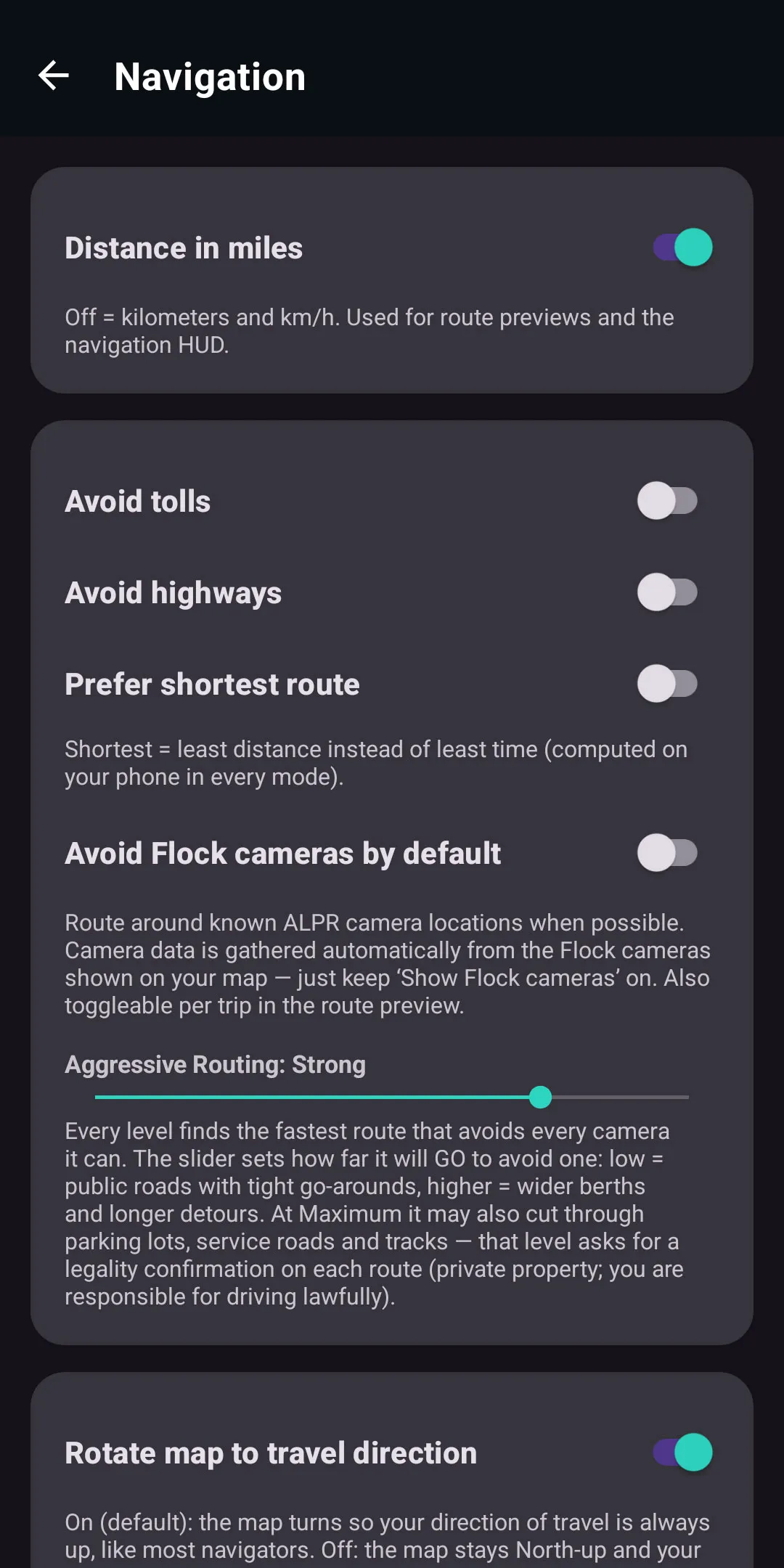
Set how hard it avoids
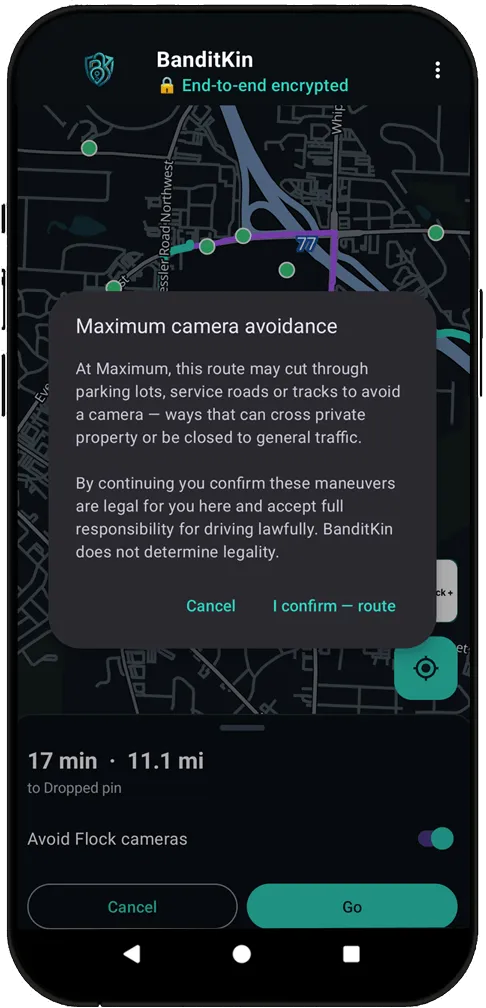
Turn on Avoid Flock cameras, then use the Aggressive Routing slider to set how far a route will go to dodge one — from tight go-arounds to wider berths and longer detours. Its top setting can cut through lots and service roads, and asks you to confirm it's legal on each route.
Detours only where a camera would see you
"Avoids 5 · 6 not facing your path" — avoidance is field-of-view-aware, so cameras aimed away from your route don't cost you a detour.
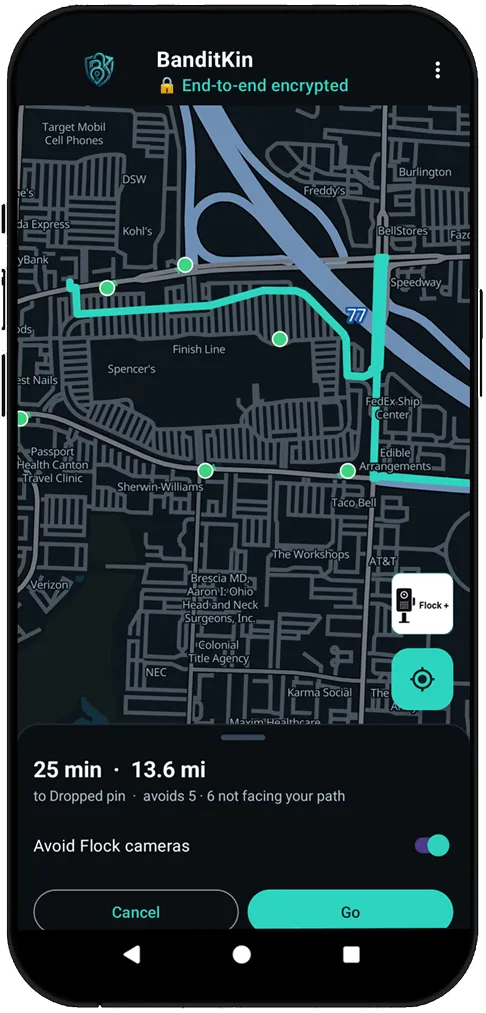
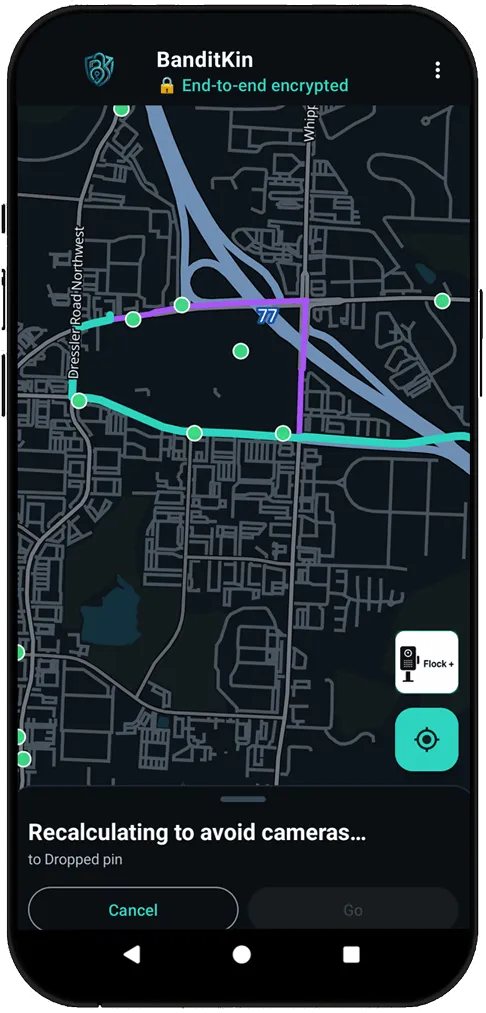
Reroutes around cameras mid-drive
Miss a turn and the route recalculates to avoid cameras on the new path — all computed on your phone.
The Maximum setting asks first
At Maximum, a route may use parking lots or service roads — after a per-route confirmation that those maneuvers are legal for you. BanditKin doesn't determine legality; the driver is responsible.
U-turn crossovers
The median crossovers no other map shows
On divided highways, the connectors that bridge the two carriageways are posted “no U-turn” for general traffic. BanditKin maps the ones in the data — plus the ones the community adds.
Toggle “Show U-turns” and each crossover is drawn as the actual connector road bridging the highway, with a no-U-turn sign centered on it — extracted from OpenStreetMap turn restrictions and median geometry.
Long-press the map to mark a crossover the data doesn't know yet. The app snaps it to the road and automatically spans it across both carriageways, so it's correct from either direction.
Your mark appears instantly and is shared anonymously as unconfirmed; other drivers confirm or retire it with the same drive-by check as cameras. Coverage is the mapped crossovers plus what the community adds.
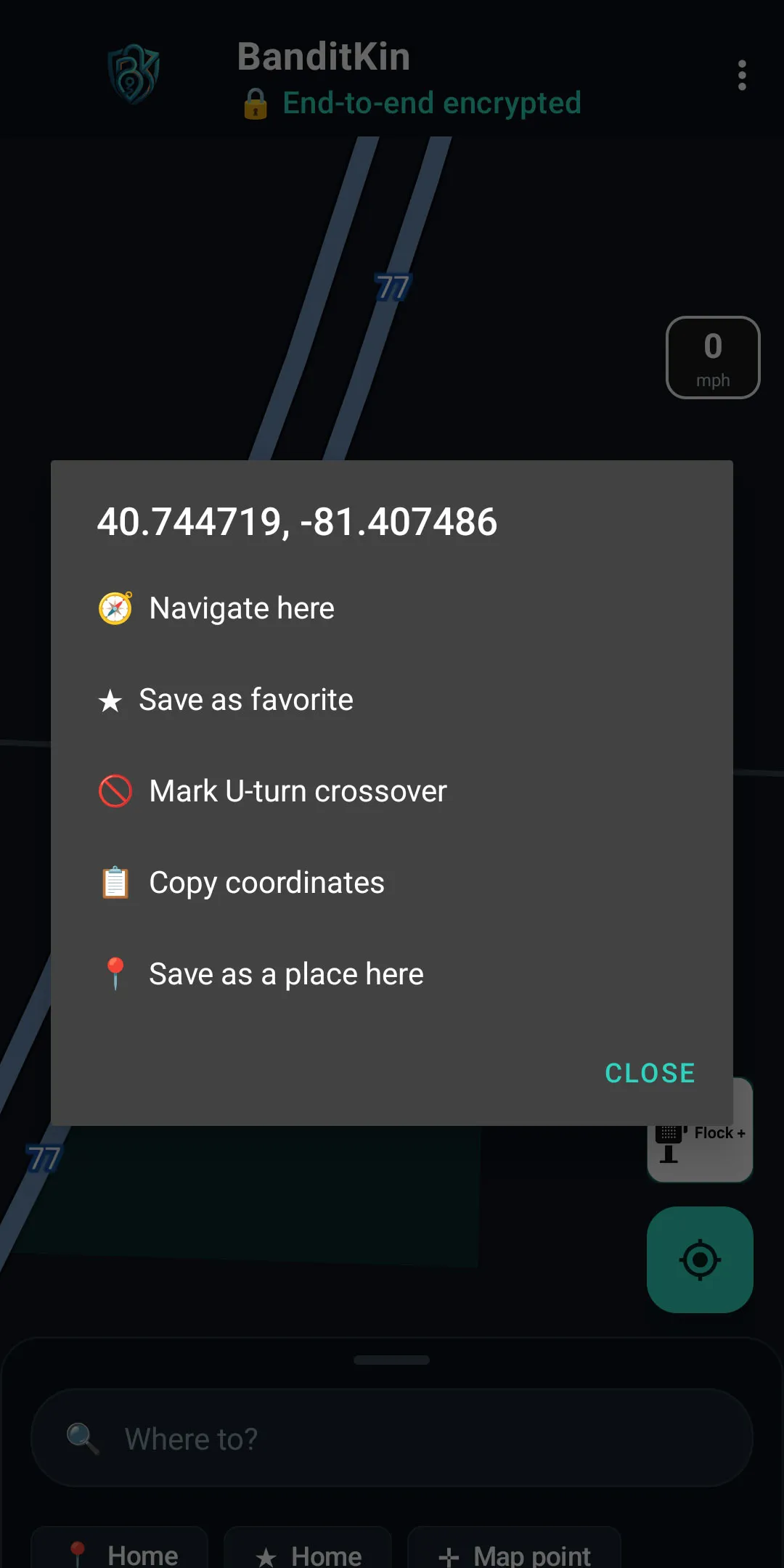
Mark one in a tap
Long-press anywhere the map is missing a crossover and choose “Mark U-turn crossover.” It's shared anonymously and confirmed by other drivers, Waze-style — no account, nothing tied to you.
First Responder mode
For authorized responders
An opt-in routing profile for law enforcement, EMS, fire, and tow or service operators whose work legitimately uses infrastructure closed to general traffic.
With the mode on, routes may use median crossovers, service roads, parking-lot cut-throughs, and alleys, and may make U-turns at mapped no-U-turn locations — paired with the U-turn crossover overlay so you see every usable one.
Starting any route with the mode on first requires confirming you're an authorized responder, legally permitted, and responsible for its use. BanditKin doesn't determine legality — the driver does.
Computed on the phone, so a dispatch center or agency gets the benefit without any vendor seeing unit movements.
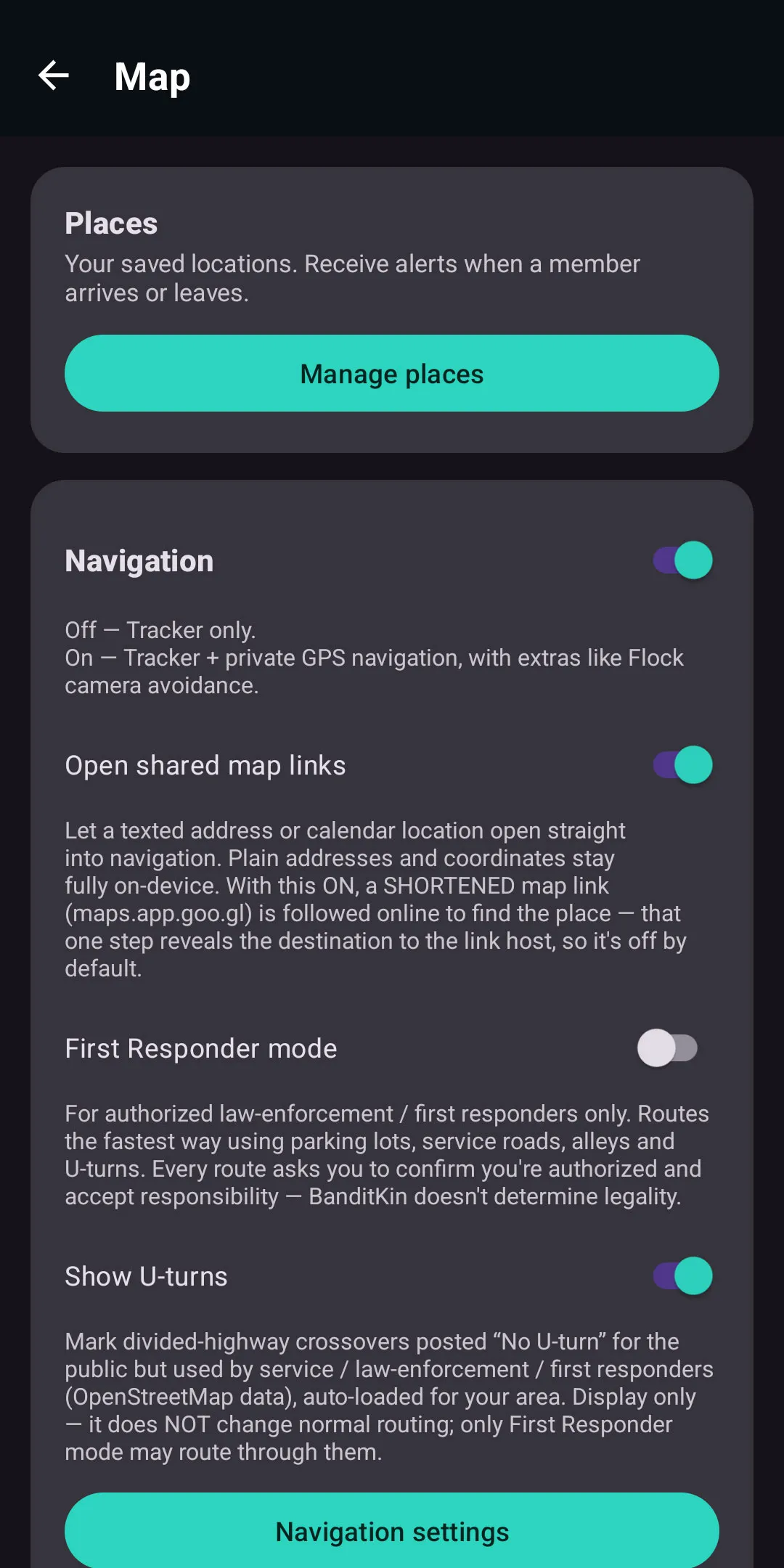
Responder tools, gated
First Responder mode and Show U-turns are opt-in. U-turn crossovers are display-only for everyone — only First Responder mode, for authorized users who confirm authorization on every route, will actually route through them.
See it in action
Private navigation, screen by screen
On-device routing, an optional camera overlay, and offline maps — here's how it looks in the app.
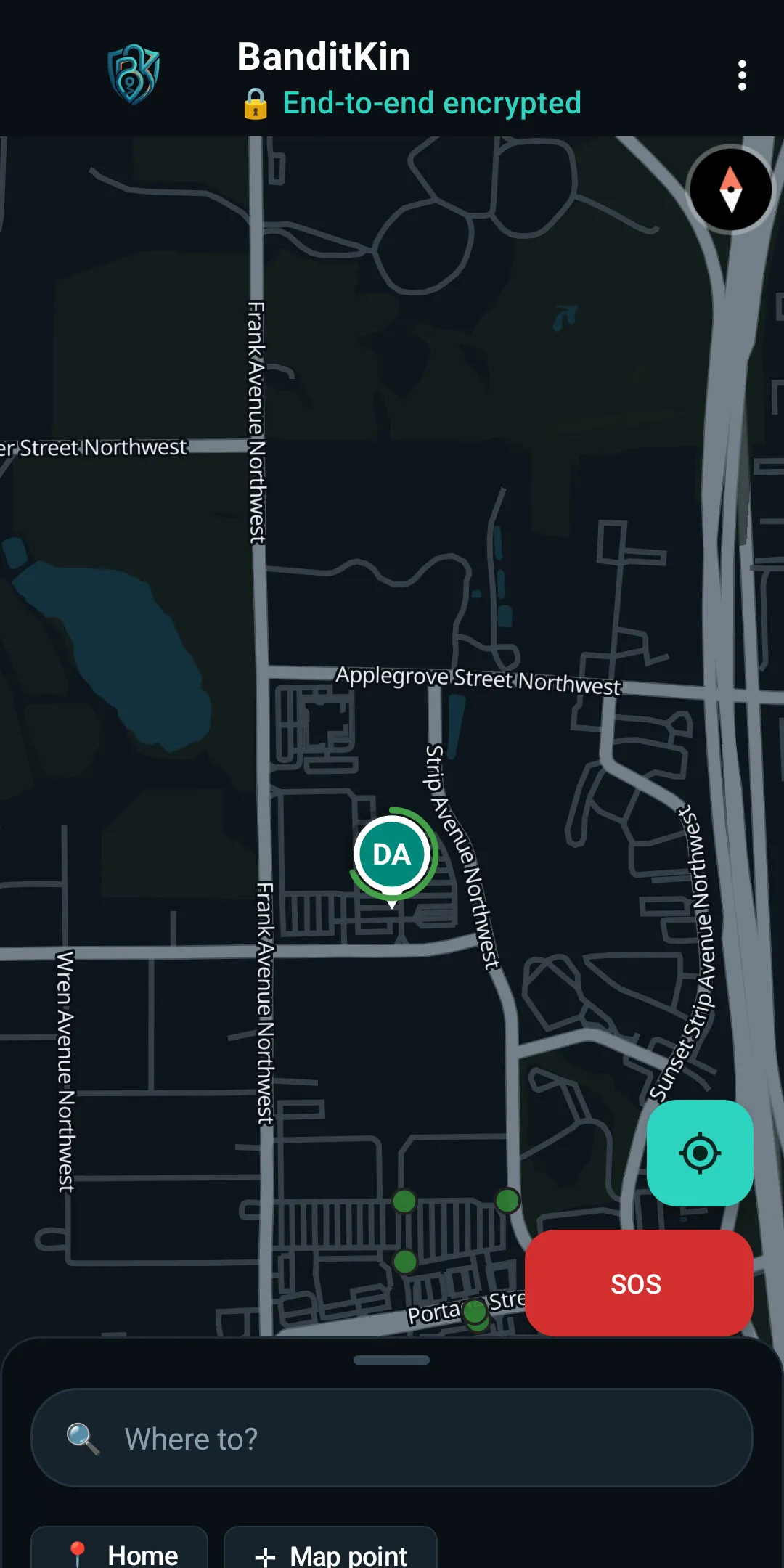
Real streets, rendered on-device
Turn-by-turn runs on a map stored on your phone, so your destination and every search stay local. Nothing about where you're headed is sent to a server.
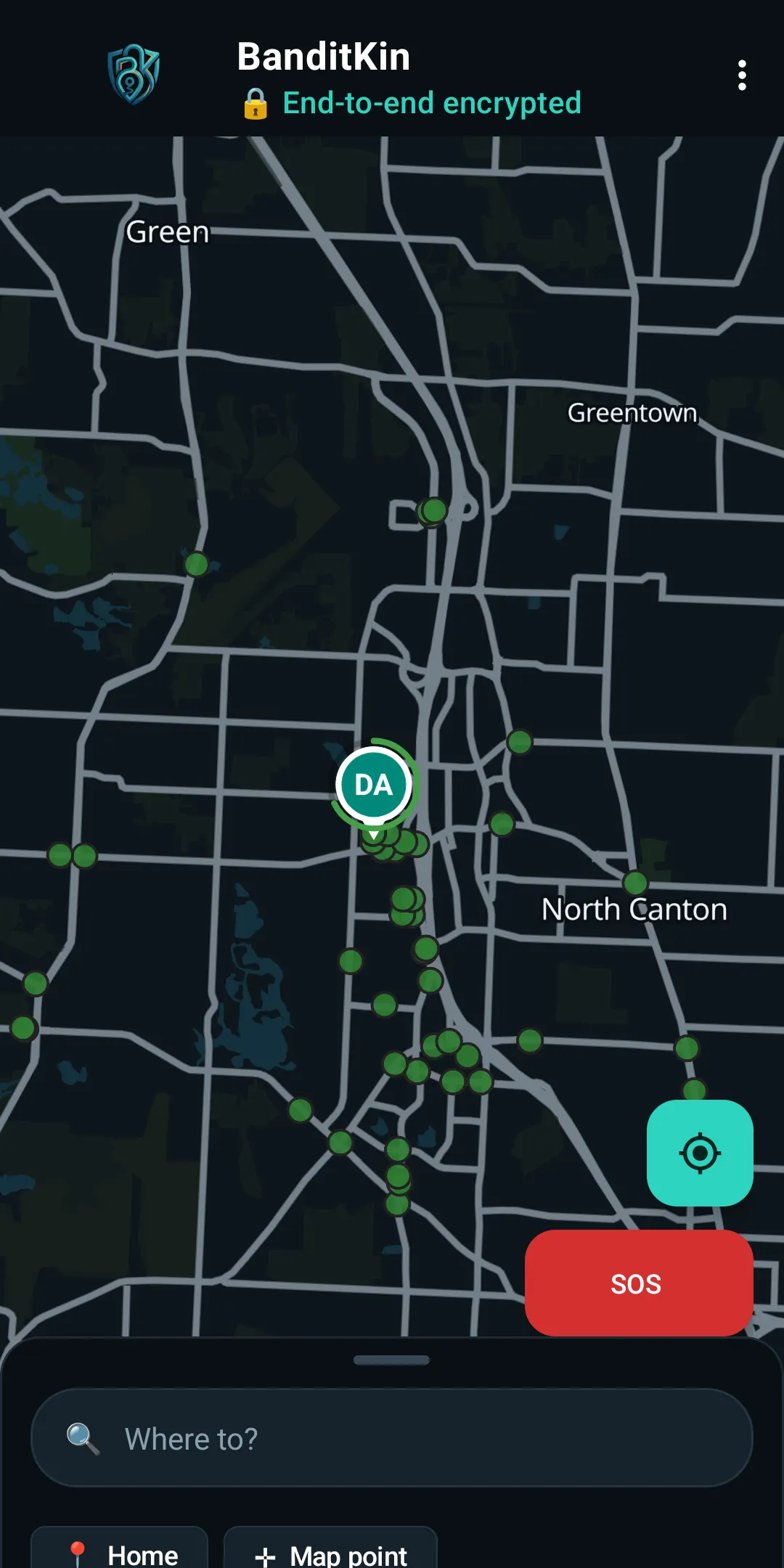
Your group and the cameras, together
Keep a live group member on the map and flip on an optional Flock ALPR overlay, so you can navigate with full awareness of what's watching the road.
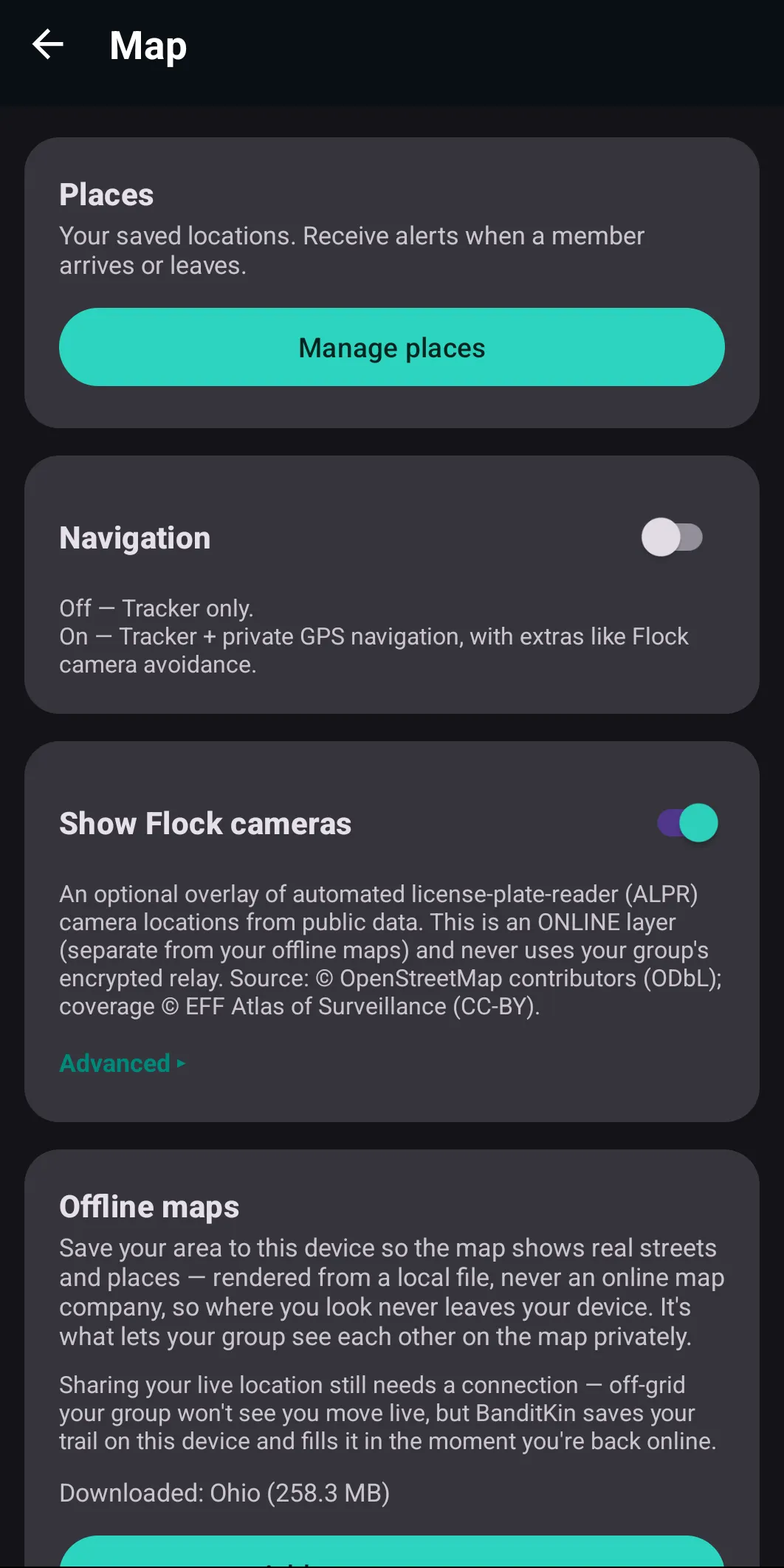
Your map, your rules
Toggle Flock cameras on or off, switch on private navigation, and download offline maps for dead zones — all from one settings panel.
On the road
Made for the drive
The full app on Android Auto
Everything BanditKin does comes to your car's screen through Android Auto — the live map, turn-by-turn navigation, your circle, and Flock camera alerts. The whole app, hands-free, eyes on the road.
Your circle, even mid-route
Navigating doesn't hide your people. Your circle stays live on the same map while you drive, so you can follow your route and keep an eye on everyone at once.
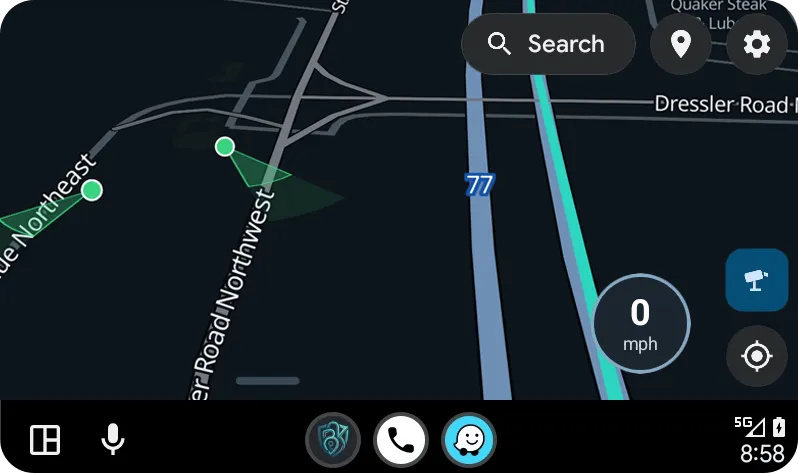
Android Auto, same privacy
Plug in and BanditKin appears in the car's app launcher — full map, search, and turn-by-turn on the car screen, with the same navigation modes as the phone. Navigation started on the phone carries over by itself.
BanditKin vs. Google Maps / Waze
This audience rewards admitting the trade-off — so here it is, plainly.
We don't have a live incident feed — the crowd hazard pings that only work if everyone constantly uploads where they are and where they're going. That's the surveillance we're built to avoid. Traffic-aware routing we can do, and do: turn on Anonymous Online mode and routes account for current traffic, fetched anonymously — the provider sees a request, never a person. We'd rather tell you the trade than fake it.
On-device by architecture, not by promise
BRouter (MIT) runs in-process — not a black box, and no server to call.
OpenStreetMap for streets and places, OpenAddresses for house numbers, the EFF Atlas of Surveillance for camera coverage — all properly attributed.
Sharing is encrypted on your phone; the key is shared in person by QR code and never touches our server.
Devices and circles are random identifiers. No email or name required, and no advertising identifiers.
No ads and no third-party analytics SDKs in the app, and no data sold to anyone.
Run the relay yourself, so even encrypted metadata stays on hardware you control — free on your own PC.
Navigation, answered
Does BanditKin send my destination anywhere?
In the two private modes — Fully Private and Private Online Assist — no: routing runs on your phone, and your destination and searches never leave the device. In Anonymous Online, the default on a new install, your query and route endpoints are sent — anonymously, through a relay, with no account or identity attached — and the app says so in the mode's own description.
Then what does go online when I navigate?
In the two private modes, only requests for map data of a general area — a state's offline map, a county's address list, or a square of road data — which the app downloads once and then reuses offline. The host that serves those files sees your IP address and which area file you requested, but never your destination or what you searched. In Anonymous Online (the default), your search text and route endpoints also go out — anonymously, through the relay.
Do I need an account?
No. There are no accounts, no email, and no advertising identifiers — your device and circle are random IDs.
How does location sharing stay private if it's sent to a server?
It's end-to-end encrypted on your phone before it's sent. The server stores ciphertext it can't read; only your circle's paired devices, which hold the key, can decrypt it. The key is shared in person by scanning a QR code and is never sent to the server.
What is “Avoid Flock”?
An optional routing preference that steers your route around automated license-plate-reader (ALPR) cameras, whose locations are public data. The avoidance is computed on your phone; your route and destination are not sent to the camera service.
Do you have live traffic?
There's no live incident feed — that would need everyone to continuously upload where they are and where they're going, which is the surveillance we avoid. Traffic-aware routing is available in Anonymous Online mode, fetched anonymously at the moment you request a route. The offline modes have no traffic data at all.
Can I run it myself?
Yes. The relay is self-hostable, so a technical user can keep all data — including metadata — on hardware they control.
What are the three navigation modes?
Fully Private (offline) computes routing and search entirely on your phone — nothing about where you're going leaves the device. Private Online Assist fetches broad area data through an anonymizing relay but still routes on-device and never sends your destination. Anonymous Online — the default on a new install — adds full search and traffic-aware routing, sending your query and route endpoints anonymously; the app labels it as less private than the others.
Can BanditKin route around Flock cameras?
Yes, as an opt-in. Turn on Avoid Flock and routing uses each ALPR camera's approximate field of view, detouring only when your path would cross a camera's view. A strength slider sets how wide a berth to give, and if no camera-free route exists it falls back to the normal route. It runs on your device, as a privacy preference — your route is never sent to the camera service.
What are U-turn crossovers?
On divided highways, the small connector roads that bridge the two carriageways are usually posted no-U-turn for general traffic. BanditKin shows the ones in the map data and lets you mark and share ones it's missing, crowd-verified. Coverage is the mapped crossovers plus what the community adds.
What is First Responder mode?
An opt-in profile for authorized users — law enforcement, EMS, fire, and service operators — that can route via crossovers, service roads, and other restricted connectors. Every route with the mode on first requires confirming you're authorized and legally permitted; BanditKin doesn't determine legality, the driver does.
Is BanditKin a good alternative to Waze or Google Maps?
For private driving, yes: turn-by-turn with posted speed limits, smooth follow-me tracking, and address search — computed on your phone in the offline modes, so your destination isn't tied to an account. The honest trade: there's no live incident feed, because that requires everyone continuously uploading their location. Traffic-aware routing is available in Anonymous Online mode, fetched anonymously. And BanditKin does things they don't: ALPR camera intelligence, U-turn crossovers, and a privacy ladder you control.
How is it different from traditional offline GPS apps?
Classic offline navigators make you manage regions, layers, and separate routing downloads. BanditKin saves your whole area in one tap — map, addresses, posted speed limits, and routing together — offers the counties along your route automatically, and never dead-ends a search: if an address is in a county you haven't saved, it recognizes the town and offers that county's data in one tap.
What will BanditKin cost?
It's free during early access. Self-hosting is always free — run the relay on your own hardware. Cloud circles get a 30-day full free trial — no card, no account — then one plan covers your whole circle: $4.99/month, $39.99/year, or a one-time $99.99 for lifetime access. Early-access users keep everything free. That fee is the entire business model — no ads, no data sales, no “you are the product.”
Take the private navigator with you
Turn-by-turn that's computed on your phone, camera intelligence, and encrypted sharing with your circle — coming to Android and iPhone. Leave your email and we'll tell you the moment it launches. Free during early access — and early users keep everything free.
Thanks — if that's the email you use on Google Play, we'll add you to the Android test within a day. Otherwise we'll email you when the public release lands.
Map & address data: © OpenStreetMap contributors (ODbL); house numbers from OpenAddresses. Camera coverage: © OpenStreetMap contributors (ODbL), with coverage context from the EFF Atlas of Surveillance (CC-BY). Routing engine: BRouter (MIT License). BanditKin is not affiliated with Google, Waze, Flock Safety, or the EFF.